Guide last verified on 1 September 2026 from a UK-based connection, based on personal troubleshooting of the Egypt eVisa portal across multiple applications in 2025-2026 and cross-referenced with user reports on Trustpilot, Reddit, and UK travel forums. Visa fees and portal behaviour may change without notice; always verify with the official portal at visa2egypt.gov.eg before travel.
If the Egypt evisa portal not working error blocks your application in 2026, check the server status, clear your browser cache and cookies, disable VPNs or ad-blockers, and try a different browser or device. If the portal remains down, apply for a visa on arrival at Egyptian airports with $25 USD cash.
Why Is the Egypt eVisa Portal Crashing or Showing a 502 Error?
The Egypt eVisa portal 502 errors stem from server overloads, maintenance windows, or user-side VPN conflicts on the visa2egypt.gov.eg backend operated by the Ministry of Interior.
The Egypt eVisa portal frequently displays a “502 Bad Gateway” or “504 Gateway Timeout” error when server demand spikes during peak travel-season applications. Server-side causes include load balancer failures, database connection drops, and unpublished maintenance windows. On the user side, an unstable connection through hotel Wi-Fi or weak mobile networks triggers a timeout error mid-submission, often accompanied by the message: “Egypt e-Visa Portal has encountered an error. Please try again later.” (reported on Reddit’s r/travel forum).
UK applicants face an additional layer: ISPs such as Virgin Media and BT may block or throttle .gov.eg domains, causing the Egypt eVisa portal to become intermittently unavailable without a clear error code. A historical example occurred during the November 10-12, 2025 incident, when the portal remained accessible but PDF visa downloads failed and the “DOWNLOAD E-VISA” button was non-functional. Egyptian authorities sent approval certificates directly via email to affected applicants, but no official restoration date was published.
Step-by-Step Troubleshooting – Fix the Portal Yourself
When the Egypt evisa portal is not working, clearing browser cache, disabling VPN, and switching to Chrome on desktop resolves most failures. To bypass UK ISP filters (Virgin Media, BT) that may throttle .gov.eg domains, switch to mobile data tethering.
Clear site-specific cache and cookies
For visa2egypt.gov.eg in Chrome, Safari, Edge, or Firefox to remove corrupted session data.
Disable VPN
Egyptian servers reject commercial VPN IP ranges (NordVPN, ExpressVPN); use Incognito mode as a quick alternative.
Disable browser extensions
Ad blockers and NoScript cause JavaScript conflicts breaking form rendering on the Egypt eVisa portal.
Try a different browser or device
Test Chrome, then Edge, then Firefox; prefer desktop over mobile. On Android Chrome, use Request Desktop Site as iOS Safari hides buttons via viewport constraints.
Switch internet connection
Mobile data tethering bypasses UK ISP filters (Virgin Media, BT) that may throttle .gov.eg domains.
Check server status
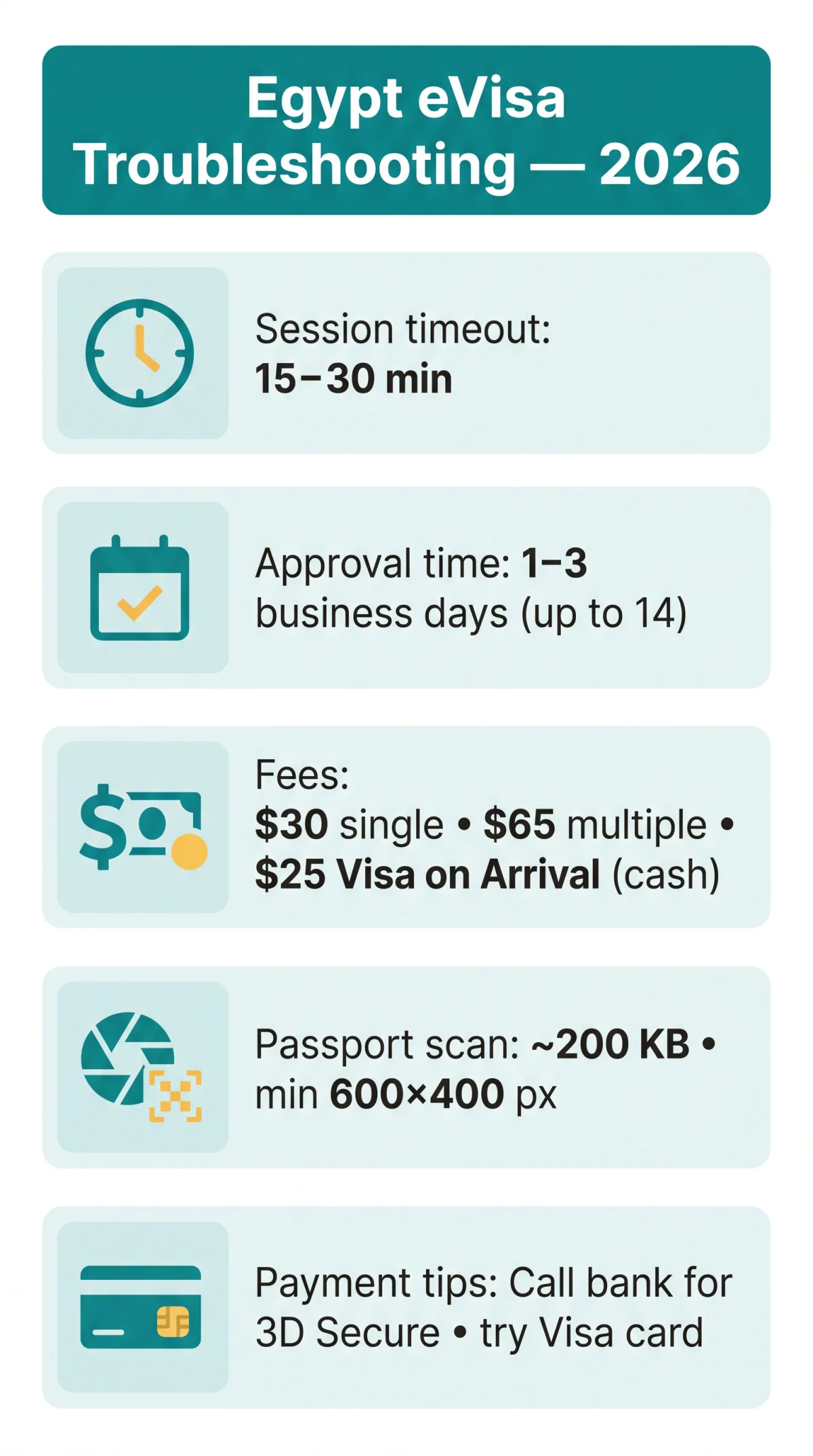
Via DownDetector or IsItDownRightNow. The Egypt eVisa portal enforces a session inactivity timeout of approximately 15 to 30 minutes.
Portal Down? Here’s Exactly What to Do Next
If the Egypt eVisa portal stays inaccessible after troubleshooting, travellers can obtain a visa on arrival at Egyptian airports for $25 USD cash. Follow this decision path:
- Do you already have an application ID? Yes: wait for an email approval certificate (check spam). This document is legally valid for entry but contains no QR code. No: continue below.
- Are you eligible for Visa on Arrival? Yes: proceed to the airport with $25 USD cash and a passport valid for 6 months. No: continue below.
- Contact the Egyptian Embassy in London or submit a feedback form on visa2egypt.gov.eg. Always carry your application ID and a screenshot when contacting support.
Visa on Arrival – Your Backup When the Portal Fails
At Egyptian international airports, purchase a visa sticker at bank counters located before passport control. At least 2 counters have been observed at Cairo Airport. Expect long queues. A digital VoA with a QR code launched at Cairo Airport in August 2026.
Payment Troubleshooting for UK Travellers
UK-issued debit or credit cards frequently fail on the Egypt eVisa payment page when 3D Secure handshakes are blocked by anti-fraud algorithms at British banks. The Egypt eVisa portal accepts debit card payments only after all applicant data has been registered.
- 3D Secure / OTP failure: Call your bank to whitelist the transaction; try Visa over Mastercard; use a different card.
- Payment page submit button obscured: Scroll left or zoom out to reveal the hidden input box on the left-hand side of the Egypt eVisa portal.
- Duplicate charge after failed payment: Do NOT retry immediately. Screenshot the bank transaction, wait 24-48 hours for auto-reversal, then contact your bank citing “visa2egypt.gov.eg duplicate charge” and email portal support with your application ID.
The single-entry eVisa fee is $30 USD (multiple-entry: $65 USD), payable by debit card, and is non-refundable even on technical rejection.
Avoiding Portal Crashes – Status Monitoring and Prevention
Checking the Egypt eVisa portal server status via DownDetector and applying during off-peak Cairo hours prevents crash frustration. No official maintenance schedule is published by the Ministry of Interior.
- Check before starting: Use DownDetector or IsItDownRightNow for the
visa2egypt.gov.egdomain; sign up for DownDetector alerts. - Off-peak timing: Early morning GMT equals late evening in Cairo (GMT+2), when server load on the Egypt eVisa portal is lower.
- Bookmark the FAQ page: visa2egypt.gov.eg/eVisa/FAQ for status updates and official guidance.
- Seasonal surges: School holidays and peak tourist months increase server load; apply at least 7 days before departure.
Mobile Browser Issues – Portal Not Working on Your Phone
The Egypt eVisa portal renders incorrectly on mobile browsers; requesting desktop mode or using a PC reveals hidden submit buttons and broken menus caused by viewport constraints on iOS Safari and Android Chrome.
- iOS Safari: Address bar hides form fields; viewport constraints obscure the “DOWNLOAD E-VISA” button on the Egypt eVisa portal.
- Android Chrome: Enable “Request Desktop Site” in browser settings before starting the application.
- File upload on mobile: Passport scan must be approximately 200 KB; pre-compress with TinyPNG or Squoosh. Minimum dimensions ~600 x 400 px, 300 DPI. Use a simple filename like
passport.jpgwith no spaces, parentheses, or special characters.
Form and Payment Errors That Look Like Portal Crashes
The Egypt eVisa portal rejects special characters in form fields and silently fails on oversized uploads, while the save/resume function is unstable.
| Problem | Solution |
|---|---|
| Form rejects hyphens (-), commas (,), full stops (.), accents, question marks (?), slashes (/) | Replace punctuation with a space or omit special characters entirely |
| Photo upload silently fails | Keep file size at approximately 200 KB; pre-compress with TinyPNG or Squoosh (portal specs are unclear on resolution) |
| Passport scan rejected | Minimum dimensions ~600 x 400 px, 300 DPI; use a simple filename like passport.jpg – no spaces, parentheses, or special characters |
| Save/resume wipes data or creates duplicate profiles | Prepare all information beforehand and complete the application in one sitting without using the save function |
| Hotel address field too small | Omit postcode and country; enter “self” in the host field with your own phone number and email |
| UK card 3D Secure / OTP failure | Call your bank to whitelist the transaction; try Visa over Mastercard; use a different card |
| Payment page submit button obscured | Scroll left or zoom out to reveal the hidden input box on the left-hand side |
| Duplicate charge after failed payment | Do NOT retry immediately. Screenshot the bank transaction, wait 24-48 hours for auto-reversal, then contact your bank citing “visa2egypt.gov.eg duplicate charge” and email portal support with your application ID |
Frequently Asked Questions (FAQ)
Can I get a visa on arrival if the Egypt eVisa portal is not working?
Yes, if eligible. A visa on arrival costs $25 USD cash at bank counters before passport control at Egyptian international airports. Long queues are possible. A digital visa on arrival with a QR code is also available at Cairo Airport as of August 2026.
What do I do if I’ve been charged twice for my Egypt eVisa?
Do not retry the transaction immediately. Take a screenshot of your bank statement and wait 24-48 hours for an automatic reversal. If the duplicate charge persists, contact your issuing bank citing a “visa2egypt.gov.eg duplicate charge” and email the portal support team with your application ID.
How long does Egypt eVisa approval take in 2026?
Approval typically takes 1-3 business days. During technical backlogs or security reviews, processing can extend to 7 or even 14 days. Apply at least 7 days before your departure date. The $30 USD single-entry fee ($65 USD multiple-entry) is non-refundable on technical rejection.
Why does the Egypt eVisa portal reject my name with special characters?
The Egypt eVisa portal does not support special characters such as hyphens, commas, full stops, accents, question marks, or slashes in form fields. Replace punctuation with a space between words or omit the special characters entirely when entering your personal information.
What is the recommended photo size for the Egypt eVisa portal upload?
The recommended file size for your photo upload is approximately 200 KB. Portal specifications regarding resolution are unclear. For passport scans, a minimum of roughly 600 x 400 px at 300 DPI has been tested successfully. Use simple filenames like passport.jpg without spaces or special characters.
Why is my UK card declined on the Egypt eVisa payment page?
UK-issued debit or credit cards often fail because 3D Secure handshakes are blocked by anti-fraud algorithms at British banks. To fix this, call your bank to whitelist the transaction, retry with a Visa card over a Mastercard, or try a different card. Also check for a payment page layout bug on the Egypt eVisa portal that obscures the submit button.
Does the email approval certificate work without a QR code?
Yes, the email approval certificate is official proof of approval and is legally valid for entry. It contains the period of validity and is accepted at entry checks upon arrival in Egypt. It lacks a QR code, but this does not invalidate the document when presented to border control.
What is the best browser for the Egypt eVisa portal from the UK?
Desktop browsers generally perform better than mobile browsers. Google Chrome, Microsoft Edge, and Mozilla Firefox are the most tested options. If you must use a mobile device, request the desktop site in your browser settings, as mobile viewports often hide buttons and break menus on the Egypt eVisa portal.
How do I check if the Egypt eVisa site is down?
You can check the portal status using third-party monitoring tools like DownDetector or IsItDownRightNow before starting your application. Additionally, check the official portal FAQ at visa2egypt.gov.eg/eVisa/FAQ or sign up for DownDetector alerts for the visa2egypt.gov.eg domain.
Can I save my Egypt eVisa application and resume later?
No. The Egypt eVisa portal’s save and resume function is unstable. Saving your data may either wipe the entered information or create duplicate applicant profiles. Prepare all your data and documents before starting the application and complete it in one sitting to avoid losing your progress.